

Encrypted at rest
Secrets rest encrypted, and are injected at the host boundary only for approved endpoints.
Sandboxed execution
Tool run in containers, are resource limited and can only contact allowlisted endpoints.
Leak Detection
Outbound traffic is scanned in real time. Secret-like data is blocked before exfiltration.
Network Allowlisting
Tools can reach only pre-approved endpoints. No silent phone-home to unknown hosts.
Data Flow
The security architecture illustrates IronClaw’s defense in depth approach with four independent protection layers that data flows through before reaching the LLM and external services.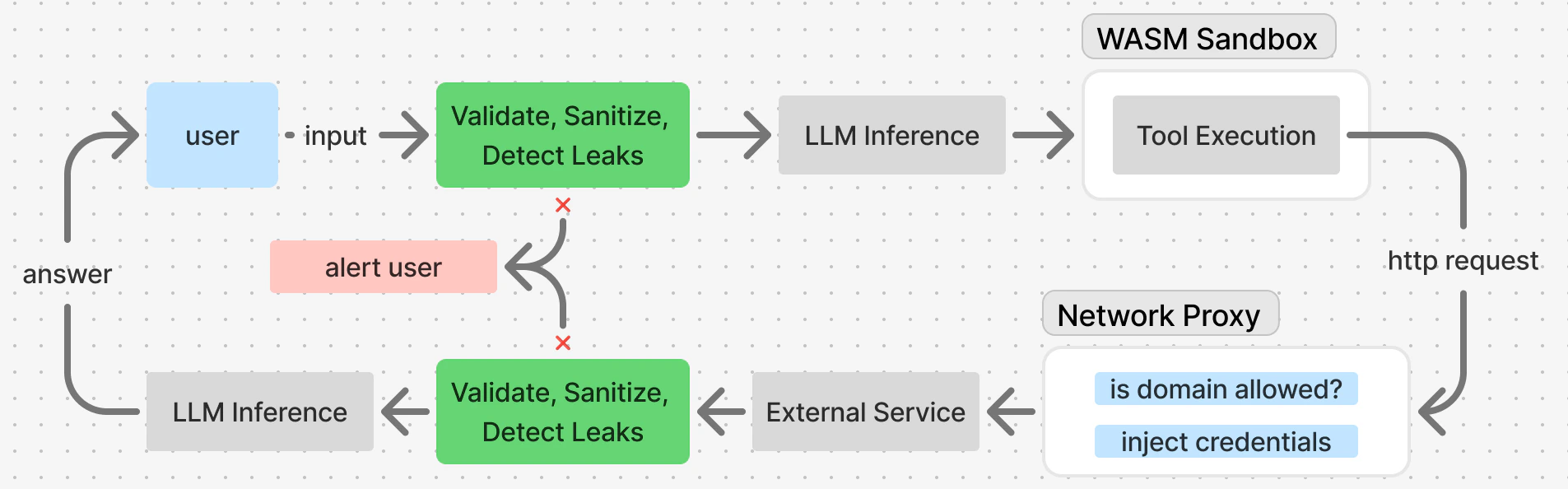
Prompt Injection Defense
Multiple layers protect against prompt injection:- Input validation — Length, encoding, forbidden patterns
- Sanitizer — Escapes dangerous content
- Policy engine — Severity-based actions
- Leak detector — Scans for 15+ secret patterns
- Tool output wrapping — XML format with escape hints
Leak Detector
IronClaw scans all input going to the LLM - be that user input or the result of running a tool - for potential leaks of sensitive information. The leak detector uses a combination of regex patterns and heuristic checks to identify potential secrets:Command Injection Detection
Shell commands are checked for injection attempts:Credential Management
Tools cannot access secrets directly, instead, they define what keys, oauth tokens, or API credential they need. Then they proceed to create the necessary requests, and the network proxy injects these credentials into outgoing requests without exposing them to the container.Limited Network Access
Tools must be explicit about which external services they can contact. This is configured in thecapabilities section of your agent config: