> ## Documentation Index
> Fetch the complete documentation index at: https://docs.ironclaw.com/llms.txt
> Use this file to discover all available pages before exploring further.
# Security
> IronClaw 的纵深防御安全架构
IronClaw 从一开始就把安全作为核心原则。我们采用纵深防御架构,通过多层彼此独立的保护机制,在启用强大智能体能力的同时保障您的数据安全。
密钥以加密形式存储,只有在通过审批的端点请求时才会在主机边界注入。
工具在容器中运行,受到资源限制,并且只能访问允许列表中的端点。
出站流量会被实时扫描,疑似密钥数据会在外泄前被阻止。
工具只能访问预先批准的端点,不能悄悄连接未知主机。
***
## 数据流
这张安全架构图展示了 IronClaw 的**纵深防御**思路:数据在到达 LLM 与外部服务之前,会依次经过四层独立保护。
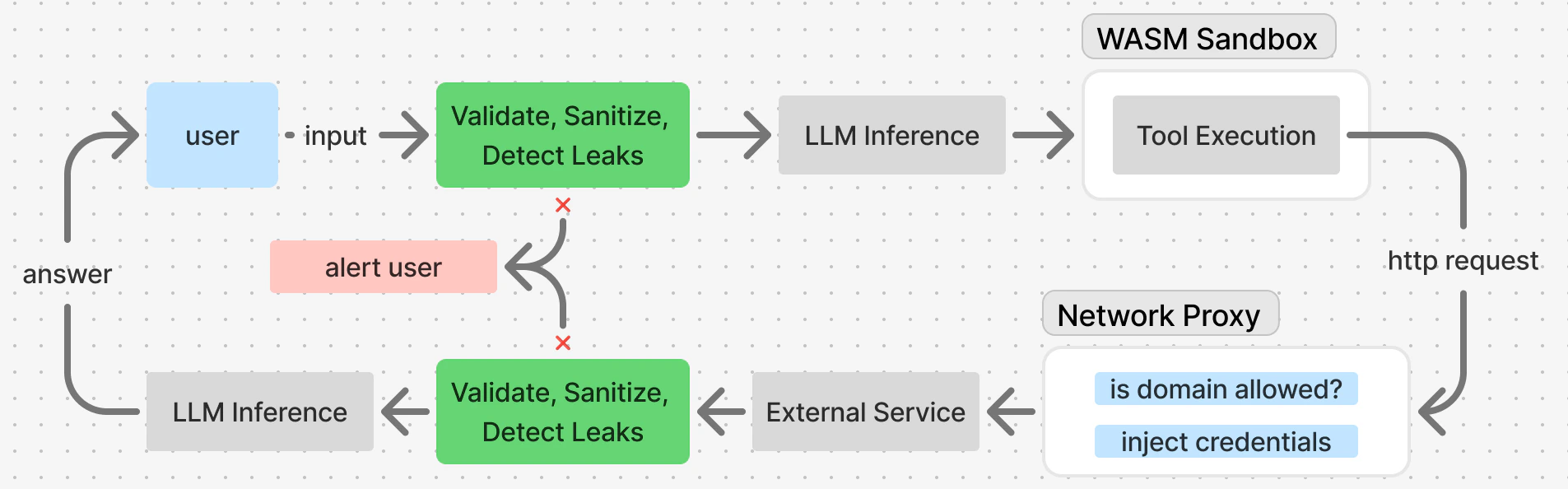 在整个流程中,密钥始终与普通数据分离,并以更严格的方式处理。它们在静态时会被加密,不会进入容器,只会在网络代理层注入到出站请求中。
***
## 提示注入防护
针对提示注入,IronClaw 通过多层机制进行保护:
1. **输入校验**:长度、编码与禁止模式检查
2. **清洗器**:转义危险内容
3. **策略引擎**:按严重级别执行不同处理动作
4. **泄漏检测器**:扫描 15 种以上的密钥模式
5. **工具输出包装**:采用带转义提示的 XML 格式
***
## 泄漏检测器
IronClaw 会扫描所有发往 LLM 的输入,无论是用户输入还是工具执行结果,以识别潜在的敏感信息泄漏。
泄漏检测器结合正则模式与启发式规则来识别潜在密钥:
| 模式 | 示例 |
| ------------ | --------------------------------- |
| API 密钥 | `sk-...`, `ak-...` |
| Token | `ghp_...`, `sess-...` |
| 私钥 | `-----BEGIN RSA PRIVATE KEY-----` |
| 连接字符串 | `postgres://user:pass@...` |
| AWS 凭证 | `AKIA...` |
| GitHub Token | `ghp_...` |
***
## 命令注入检测
Shell 命令会被检查是否存在注入尝试:
```bash theme={null}
# 已阻止:命令链
cat file; rm -rf /
# 已阻止:子 shell
echo $(cat /etc/passwd)
# 已阻止:路径穿越
cat ../../../etc/passwd
```
***
## 凭证管理
工具不能直接访问密钥。相反,它们只声明自己需要哪些 key、OAuth token 或 API 凭证,然后构造请求,由网络代理在出站时注入这些凭证,而不会把它们暴露给容器。
```json theme={null}
"credentials": {
"google_oauth_token": {
"secret_name": "google_oauth_token",
"location": { "type": "bearer" },
"host_patterns": ["gmail.googleapis.com"]
}
}
```
***
### 受限的网络访问
工具必须明确声明自己可以访问哪些外部服务。这通过智能体配置中的 `capabilities` 部分完成:
```json theme={null}
{
"network": {
"allowed_hosts": ["api.example.com"]
},
"workspace": {
"allowed_prefixes": ["telegram/"]
}
}
```
在整个流程中,密钥始终与普通数据分离,并以更严格的方式处理。它们在静态时会被加密,不会进入容器,只会在网络代理层注入到出站请求中。
***
## 提示注入防护
针对提示注入,IronClaw 通过多层机制进行保护:
1. **输入校验**:长度、编码与禁止模式检查
2. **清洗器**:转义危险内容
3. **策略引擎**:按严重级别执行不同处理动作
4. **泄漏检测器**:扫描 15 种以上的密钥模式
5. **工具输出包装**:采用带转义提示的 XML 格式
***
## 泄漏检测器
IronClaw 会扫描所有发往 LLM 的输入,无论是用户输入还是工具执行结果,以识别潜在的敏感信息泄漏。
泄漏检测器结合正则模式与启发式规则来识别潜在密钥:
| 模式 | 示例 |
| ------------ | --------------------------------- |
| API 密钥 | `sk-...`, `ak-...` |
| Token | `ghp_...`, `sess-...` |
| 私钥 | `-----BEGIN RSA PRIVATE KEY-----` |
| 连接字符串 | `postgres://user:pass@...` |
| AWS 凭证 | `AKIA...` |
| GitHub Token | `ghp_...` |
***
## 命令注入检测
Shell 命令会被检查是否存在注入尝试:
```bash theme={null}
# 已阻止:命令链
cat file; rm -rf /
# 已阻止:子 shell
echo $(cat /etc/passwd)
# 已阻止:路径穿越
cat ../../../etc/passwd
```
***
## 凭证管理
工具不能直接访问密钥。相反,它们只声明自己需要哪些 key、OAuth token 或 API 凭证,然后构造请求,由网络代理在出站时注入这些凭证,而不会把它们暴露给容器。
```json theme={null}
"credentials": {
"google_oauth_token": {
"secret_name": "google_oauth_token",
"location": { "type": "bearer" },
"host_patterns": ["gmail.googleapis.com"]
}
}
```
***
### 受限的网络访问
工具必须明确声明自己可以访问哪些外部服务。这通过智能体配置中的 `capabilities` 部分完成:
```json theme={null}
{
"network": {
"allowed_hosts": ["api.example.com"]
},
"workspace": {
"allowed_prefixes": ["telegram/"]
}
}
```